Download Doomsday Express for free:
View in App Store
Friday, July 27, 2012


Monday, July 2, 2012


Wednesday, May 30, 2012


Monday, March 26, 2012
Doomsday Express on the New iPad
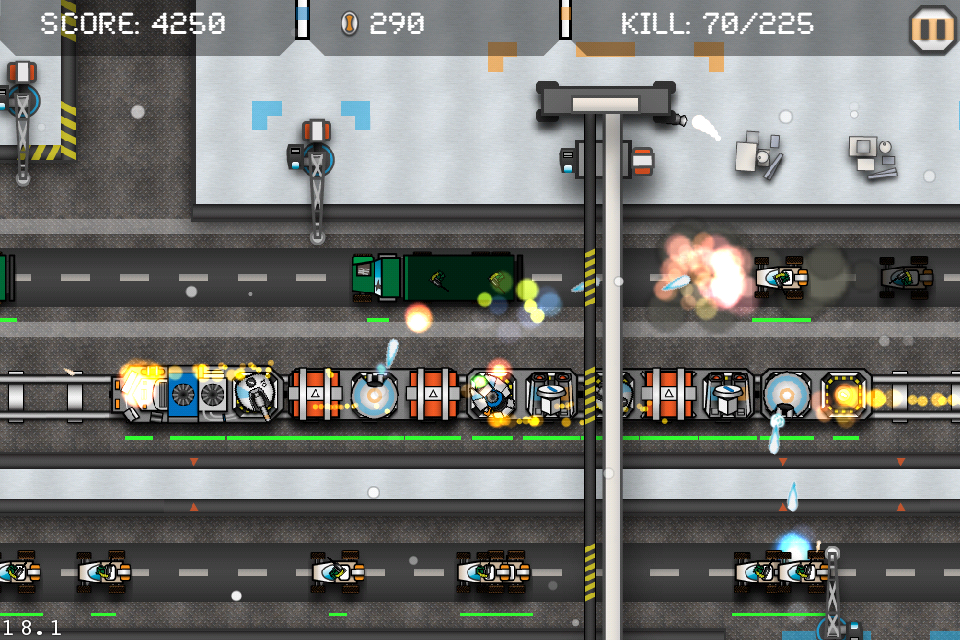
The performance of the New iPad is crazy... I am able to do full-screen motion blur for the New iPad and the frame rate is still maxed out at 60FPS, while on iPhone4 it drops to 10FPS (thus iPhone4 version of Doomsday Express is not going to have motion blur). Screenshots of two trains bombarding each other attached.


Wednesday, December 28, 2011

Friday, June 18, 2010
Smart Brick HD for iPad is Available in App Store !
Store link:
itms://itunes.apple.com/us/app/smart-brick-hd/id375581327?mt=8
Monday, May 31, 2010
Smart Brick Lite is Available in App Store
Smart Brick Lite is LIVE in Apple Store! Have a free trial:
itms://itunes.apple.com/us/app/smart-brick-lite/id373771120?mt=8
Thursday, May 27, 2010
Thursday, May 13, 2010
Smar Brick is LIVE on App Store!
Features:
- Full 3D graphics running smoothly at 40 FPS (on iPhone 3GS)
- Variant level designs with different pace, play styles and goals
- Smooth and intuitive multi touch control
- different sets of bricks, suiting from newbies to experts
- Multiple relaxed casual levels to spend time on, each has a distinct theme
- Full dynamic animation and background
- A highscore board where you can challenge yourself or your friends
How to play:
- Double tap the brick to drop it
- Press on the brick and hold to drag it around
- Tab the spinning rectangles around the brick to turn it in the shown direction
- Try fill up a full layer to make it disappear and score!
Game modes:
- Elimination: you must resolve specific bricks that scattered in the level to win. Some are hard to reach, and time is limited.
- Time Killer: have some time to spend on bus or subway? Relax and score as much as you can in the beatiful levels. No time limit.
Vist: warpdreams.blogspot.com for more screenshots and information about other games.
If you have any suggestions or need support, write to: dreams.warp@gmail.com


Store Link:

Tuesday, May 4, 2010
Wednesday, April 28, 2010

Monday, April 26, 2010


Friday, April 23, 2010
Tuesday, April 20, 2010


Friday, April 16, 2010
Sunday, April 11, 2010

Wednesday, April 7, 2010
Warp Dreams Logo
I consulted a logo design studio for a quote and they presented a whopping $1750 price tag... Well, not that I don't recognize the value of their work, but that price is simply way above my budget. So I DIYed one myself using a toy-like Paintbrush on Mac OS X. (GIMP for Mac just sucks because X window on Mac sucks. You have to click twice on a button to activate it if the window contains it is not the active window). Look at left of the page.
It does has some issues, like: top-right proportion of the logo seems too empty. However, I think it works for now. Maybe I'll pay $1750 when I am rich.
Using short value in vertex array instead of float
I've been trying to squeeze more FPS from the rendering part of Smart Brick. I came across an article which suggests using GL_SHORT instead of GL_FLOAT in vertex array to boost performance:
The solution quite makes sense. Basically you use short value to replace float values; to compensate the precision loss, a pair of additional glScalef and glTranslatef is required per-model.
A reply attached at the end of the post suggests that on iPhone it would be 30% faster. However, this is not the case for Smart Brick; not because the article is wrong, but I think the performance increment depends on actual scenarios. Here is my guess:
If your model contains large amounts of vertices the solution may help a lot. You get big computational savings for using short instead of float, with the price of only one additional glScale and glTranslate calls respectively.
However, it does not help Smart Brick, because Smart Brick renders large amounts of models, each of them contains only few vertices. This way, the savings on float vertices are probably offset by glScale and glTranslate calls, because they are called once per-model, and they are called a lot when there are a lot of models.
Monday, April 5, 2010
Smark Brick Game Play
This is a demo showing 2D mode in Smart Brick. Well, 2D is a special case of 3D after all.
The true 3D mode in Smart Brick.
Thursday, April 1, 2010


Subscribe to:
Posts (Atom)

